
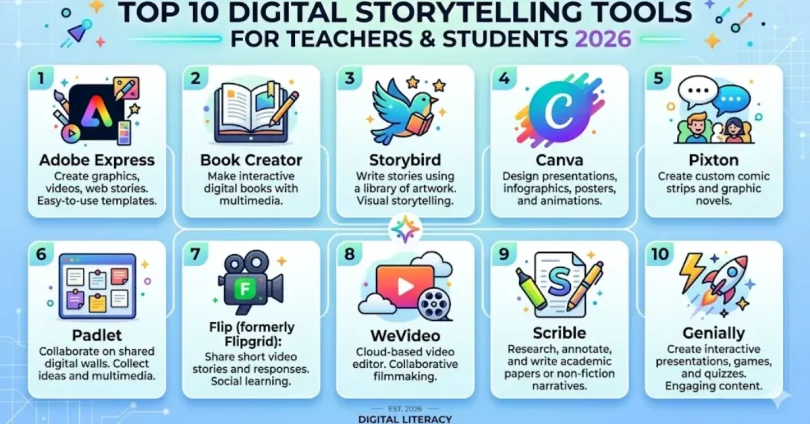

Introduction
In today’s fast-moving digital world, the way we share stories has completely transformed. Digital storytelling is the modern way of combining traditional storytelling with multimedia elements like images, videos, audio, and interactive content. It allows individuals, teachers, and students to express ideas more engagingly and creatively than ever before.
If you are wondering what is digital storytelling tools, they are platforms or software that help you create, edit, and present stories using digital formats. These tools make it easier to turn simple ideas into compelling visual narratives without needing advanced technical skills. From classrooms to marketing and social media, digital storytelling tools are now an essential part of communication.
Storytelling itself is not new. It has been part of human culture for centuries, starting from oral traditions to written books and then moving into films and digital media. With the rise of technology, storytelling has evolved into a more interactive and immersive experience. Today, anyone with access to the internet can create and share powerful stories with a global audience, making it an essential tool for Online Learning.
This is where digital storytelling tools play a crucial role. They provide the features and flexibility needed to combine creativity with technology. Whether you are a teacher trying to make lessons more engaging, a student working on a project, or a content creator building a brand, these tools help bring stories to life in ways that capture attention and make an impact.
What are Digital Storytelling Tools and Why They Matter
Understanding what is digital storytelling tools is important if you want to create engaging and meaningful content in today’s digital space. In simple terms, digital storytelling tools are online platforms or software that help users create stories using multimedia elements such as text, images, audio, video, and animations. These tools are designed to make storytelling easier, more interactive, and visually appealing.
The meaning of digital storytelling tools goes beyond just creating content. It is about transforming ideas into experiences that connect with an audience. Instead of relying only on written words, these tools allow you to present stories in a way that captures attention and keeps people engaged for longer periods of time.
Digital storytelling matters today because people consume content differently. Audiences prefer visual and interactive content over plain text. Whether it is in education, marketing, or social media, storytelling has become a powerful way to communicate messages effectively. With the help of digital storytelling tools, even complex ideas can be simplified and presented in a way that is easy to understand.
Another reason why digital storytelling tools are important is accessibility. You do not need to be a professional designer or video editor to create high-quality stories. Many tools are user-friendly and designed for beginners, making them suitable for teachers, students, and learners at all levels.
In real-world use, digital storytelling tools are widely used in classrooms to improve learning, in businesses to build brand identity, and by content creators to engage their audience. This growing demand shows that digital storytelling is not just a trend but a necessary skill in the modern digital age.
Benefits of Using Digital Storytelling Tools in Education

Digital learning has changed the way students understand and interact with information, and digital storytelling tools are playing a big role in this transformation. These tools are not just about creating stories; they help make learning more engaging, interactive, and meaningful for both teachers and students.
One of the biggest benefits of using digital storytelling tools in education is increased student engagement. Traditional teaching methods can sometimes feel boring or difficult to follow, but when lessons are turned into visual stories with images, videos, and audio, students naturally become more interested and involved.
Another important advantage is improved creativity. When students use digital storytelling tools for education, they are not just consuming information; they are creating it. This encourages them to think critically, organize their ideas, and present them uniquely and creatively. It also helps build confidence, as students can express their thoughts more freely.
These tools also support better understanding and retention. Visual and interactive content is easier to remember compared to plain text. Teachers can explain complex topics through storytelling, making lessons simpler and more relatable. This is especially useful for younger learners and students who struggle with traditional learning methods.
In addition, digital storytelling tools education helps develop essential digital skills. Students learn how to use technology effectively, which is very important in today’s world. From basic editing to combining multimedia elements, these skills prepare them for future academic and professional challenges.
Overall, digital storytelling tools create a more dynamic and inclusive learning environment where both teachers and students can collaborate, create, and communicate more effectively.
Best Digital Storytelling Tools for Teachers and Students
Choosing the right digital storytelling tools can make a huge difference in how effectively stories are created and shared. Today, there are many tools available that support video creation, interactive storytelling, presentations, and even animation. These tools are designed for both beginners and professionals, making them ideal for teachers, students, and learners.
Below is a useful comparison table of some of the best digital storytelling tools used in education and content creation:
Best Digital Storytelling Tools Comparison Table
| Tool Name | Best For | Key Features | Free Version | Ease of Use | Ideal Users |
|---|---|---|---|---|---|
| Canva | Visual storytelling & presentations | Drag and drop design, templates, images, videos | Yes | Very Easy | Teachers, students, beginners |
| Animoto | Video storytelling | Create videos from photos, music, and clips | Yes | Easy | Students, content creators |
| StoryboardThat | Storyboarding & comics | Scene builder, characters, storytelling templates | Yes | Easy | Kids, teachers |
| Prezi | Interactive presentations | Zooming interface, dynamic storytelling | Yes | Medium | Teachers, professionals |
| Twine | Interactive stories | Non-linear storytelling, open source | Yes | Medium | Advanced learners |
| Knight Lab Tools | Data & media storytelling | Timeline, map-based storytelling, interactive visuals | Yes | Medium | Educators, researchers |
| Vev | Web-based storytelling | Animations, scroll effects, multimedia integration | Limited | Medium | Designers, marketers |
Why These Tools Are Useful
Tools like Canva and Animoto help create visual and video-based stories easily without technical skills
Platforms such as Twine and Knight Lab allow interactive and non-linear storytelling, which increases engagement
Advanced tools like Vev provide interactive web storytelling with animations and multimedia elements
These tools show that digital storytelling tools for teachers and students are not limited to one format. You can create:
- Videos
- Presentations
- Interactive stories
- Infographics
- Storyboards
All depending on your goal and creativity.
Expert Tip
From practical experience, beginners should start with simple tools like Canva or Animoto. Once comfortable, they can move to advanced tools like Twine or Vev for more interactive storytelling. This step-by-step approach helps build both confidence and skill.
Free Digital Storytelling Tools You Can Use Today
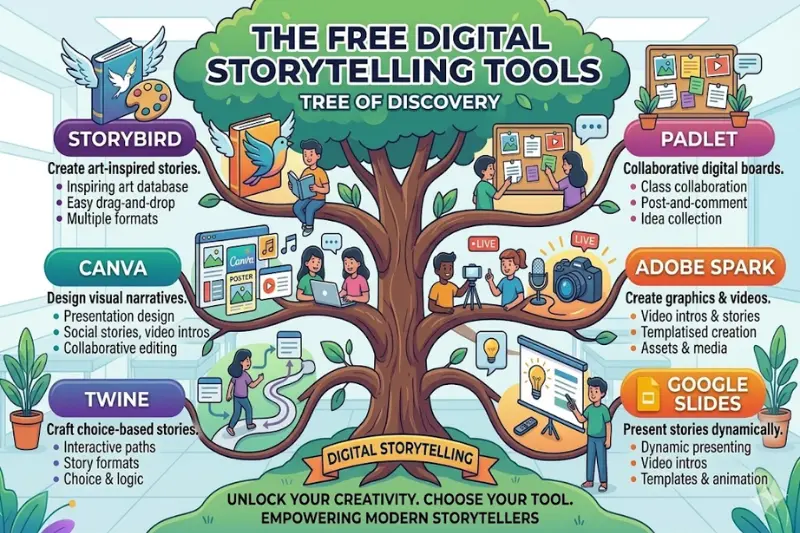
If you are just starting, you do not need to spend money to create powerful stories. There are many free digital storytelling tools available that offer excellent features for teachers, students, and beginners. These tools make it easy to create engaging content without requiring advanced technical skills.
Using digital storytelling tools’ free versions is a great way to learn, experiment, and build your creativity before moving to premium options.
Free Digital Storytelling Tools Comparison Table
| Tool Name | Best For | Key Features | Free Plan | Limitations | Ideal Users |
|---|---|---|---|---|---|
| Canva | Designs and presentations | Templates, images, video editing, drag and drop | Yes | Limited premium elements | Beginners, teachers, students |
| Adobe Express | Quick visual stories | Graphics, short videos, web pages | Yes | Watermark in some exports | Students, creators |
| Animoto | Video storytelling | Slideshow videos, music, templates | Yes | Limited video quality | Beginners |
| StoryboardThat | Comic storytelling | Characters, scenes, storyboards | Yes | Limited scenes per month | Kids, teachers |
| Book Creator | Digital books | Create ebooks with text, audio, images | Yes | Limited free library | Teachers, students |
| Powtoon | Animated storytelling | Animated videos, characters, voiceover | Yes | Watermark on free plan | Educators, marketers |
| Knight Lab Tools | Interactive storytelling | Timelines, maps, multimedia integration | Yes | Basic customization | Researchers, teachers |
Why Use Free Digital Storytelling Tools
One of the biggest advantages of free digital storytelling tools for teachers and students is accessibility. Anyone with an internet connection can start creating stories without financial barriers.
These tools are especially useful because they:
- Allow experimentation without risk
- Help develop digital and creative skills
- Provide ready made templates to save time
- Support collaboration in classrooms
For learners, these tools make assignments more interesting. For teachers, they provide new ways to explain complex topics through visuals and storytelling.
Practical Insight
In real classroom use, free tools like Canva and Book Creator are often enough for most projects. They are simple, reliable, and do not require training. However, if you need more advanced features like animation or branding, then upgrading to paid versions can be considered later.
MORE USEFUL LINKS THAT YOU WILL LIKE:
Healthcare Learning Management System: A Complete Guide
TV Full Form In Medical – Meaning, Types, Uses And FAQs
Exam Net: A Complete Guide To Online Exams, Features, Benefits, & Alternatives
Best Digital Storytelling Tools for Education in 2026
Digital storytelling is evolving fast, especially with the rise of AI and interactive learning. In 2026, the best digital storytelling tools for education are not just about creating stories—they focus on engagement, collaboration, and personalized learning experiences.
Modern digital storytelling tools for the classroom now include features like AI feedback, interactive videos, voice recording, and real-time collaboration, making learning more immersive than ever.
| Tool Name | Best For | Key Features | Free Plan | Ideal Use Case |
|---|---|---|---|---|
| Book Creator | Classroom storytelling | Multimedia books, audio narration, collaboration | Yes | Teachers and students creating digital books |
| Flip (Flipgrid) | Student engagement | Video discussions, captions, feedback tools | Yes | Classroom storytelling and discussions |
| StoryMapJS | Interactive storytelling | Maps, timelines, multimedia integration | Yes | History and geography storytelling |
| WeVideo | Video storytelling | Cloud video editing, voiceover, templates | Yes | Student video projects |
| Adobe Express | Creative storytelling | Graphics, web pages, short videos | Yes | Visual storytelling projects |
| Prezi | Dynamic presentations | Zoom based storytelling, interactive slides | Yes | Presentations and lectures |
Why These Tools Are Trending in 2026
- Tools like Book Creator now allow multimodal storytelling, combining text, audio, and visuals in one place
- Platforms such as StoryMapJS help create location-based and timeline-driven stories, making them perfect for educational use
- Video-based tools like Flip and WeVideo improve student engagement and participation, especially for shy learners
Key Trends in Digital Storytelling Tools (2026)
1. AI Integration
Many tools now include AI features like auto feedback, captions, and suggestions to improve storytelling.
2. Interactive Learning
Storytelling is no longer linear. Students can create interactive and non linear stories using tools like Twine and StoryMapJS.
3. Student Centered Learning
Modern tools focus on giving students a voice through video, audio, and creative expression.
4. Collaboration Features
Teachers and students can now work together in real time, improving teamwork and creativity.
Expert Insight
Based on current trends, tools like Flip and Book Creator are highly effective in classrooms because they balance simplicity with powerful features. Meanwhile, tools like StoryMapJS and Prezi are better for advanced storytelling where structure and presentation matter more.
Examples of Digital Storytelling Tools in Real Use
Understanding theory is helpful, but seeing digital storytelling tools examples in real situations makes it much easier to apply them. Below are practical classroom and real-world examples that show how these tools are actually used by teachers, students, and learners.
Example 1: Classroom History Project
A teacher assigns students to create a story about a historical event. Instead of writing a traditional essay, students use digital storytelling tools to build a visual narrative.
- Students add images, voice narration, and short video clips
- They present events in a timeline format
- The final story becomes more engaging and easier to understand
This is a strong example of digital storytelling tools improving both creativity and learning outcomes.
Example 2: Science Concept Explanation
In a science class, students are asked to explain a complex topic like the water cycle or human body systems.
- Students create short animated or video-based stories
- They combine diagrams, voice explanation, and text
- Concepts become easier to visualize and remember
These types of digital storytelling tools help simplify difficult subjects.
Example 3: Language Learning Activity
For language classes, storytelling is a powerful tool.
- Students create their own stories using images and voice narration
- They practice pronunciation and sentence structure
- Teachers can review and give feedback easily
This is a practical example of digital storytelling tools enhancing communication skills.
Example 4: Student Portfolio Creation
Students can use digital storytelling tools to build a personal portfolio.
- Combine projects, achievements, and experiences into a story
- Add visuals, videos, and reflections
- Share it online for academic or career purposes
This shows how digital storytelling tools for students go beyond classroom learning.
Example 5: Group Storytelling Project
Teachers assign group work where students collaborate on a single story.
- Each student contributes a part of the story
- They use shared tools to edit and build content together
- Encourages teamwork and creativity
This is one of the best uses of digital storytelling tools for the classroom.
Why These Examples Matter
These real use cases clearly show that digital storytelling tools are not just for creating content, but for:
- Improving understanding
- Encouraging creativity
- Building communication skills
- Making learning more interactive
From classrooms to personal projects, these tools are helping learners express ideas in ways that traditional methods cannot match.
Expert Insight
In real teaching environments, storytelling-based assignments consistently perform better than traditional ones. Students stay more engaged, submit more creative work, and understand topics more deeply when they use digital storytelling tools.
How to Choose the Right Digital Storytelling Tool
With so many digital storytelling tools available, choosing the right one can feel confusing. The best tool depends on your goals, skill level, and the type of story you want to create. Instead of picking randomly, it is important to choose a tool that matches your specific needs.
Choose Based on Your Purpose
Start by asking yourself what you want to create.
- For video storytelling, use tools that support video editing and voice narration
- For presentations, choose tools with interactive slides
- For interactive stories, look for tools that allow user interaction
Different digital storytelling tools for education are designed for different purposes, so clarity here will save time.
Choose Based on Skill Level
Not all tools are beginner-friendly.
- Beginners should choose simple drag-and-drop tools
- Intermediate users can explore tools with more customization
- Advanced users can use interactive or coding-based tools
If you are just starting, simple digital storytelling tools for learners will help you build confidence without feeling overwhelmed.
Choose Based on Age Group
This is especially important in education.
- For kids, use fun and simple tools with visuals and characters
- For school students, choose tools with basic editing features
- For higher education, go for advanced storytelling platforms
The right digital storytelling tools for students should match their understanding level.
Choose Based on Budget
Many tools offer both free and paid versions.
- Free tools are great for beginners and basic projects
- Paid tools offer advanced features like branding, HD exports, and more storage
If the budget is limited, start with free digital storytelling tools and upgrade only when needed.
Choose Based on Features
Look at what features you actually need:
- Templates and design elements
- Audio and video integration
- Collaboration options
- Export and sharing capabilities
The best digital storytelling tools for the classroom often include collaboration features so teachers and students can work together easily.
Quick Decision Tip
If you are unsure, follow this simple rule:
- Start simple
- Focus on creativity, not complexity
- Upgrade tools as your skills grow
Expert Insight
From practical experience, most users make the mistake of choosing complicated tools at the start. This often leads to frustration. It is always better to begin with easy tools and gradually move to advanced platforms once you understand the basics of digital storytelling.
Conclusion
Digital storytelling has become an essential skill in today’s digital age. With the right digital storytelling tools, teachers, students, and learners can transform simple ideas into engaging, interactive, and memorable stories. These tools make learning more creative, communication more effective, and content more visually appealing.
Whether you are a beginner using free digital storytelling tools like Canva or Book Creator, or an advanced user exploring interactive platforms like StoryMapJS or Flip, the key is to choose the right tool for your purpose, skill level, and audience.
Real classroom examples show that storytelling helps students retain information better, express ideas creatively, and collaborate effectively. As technology continues to evolve, digital storytelling tools will become even more powerful, making it easier than ever to share knowledge and tell compelling stories.
In short, embracing digital storytelling is not just about creating content; it’s about inspiring, engaging, and connecting with your audience in meaningful ways.
Frequently Asked Questions (FAQs)
What is digital storytelling?
Digital storytelling is the use of multimedia tools to create and share engaging stories.
What are digital storytelling tools?
Digital storytelling tools are software or platforms that help create visual, audio, and interactive stories.
Are there free digital storytelling tools for teachers?
Yes, tools like Canva, Book Creator, and StoryboardThat offer free versions for teachers.
Which are the best digital storytelling tools for students?
Canva, Animoto, Book Creator, and Prezi are popular and beginner-friendly for students.
How can digital storytelling help in education?
It improves creativity, engagement, understanding, and retention of concepts.
Can kids use digital storytelling tools?
Yes, platforms like StoryboardThat and Book Creator are designed for children.
Do digital storytelling tools work for remote learning?
Absolutely, they allow students and teachers to create and share stories online easily.
MORE USEFUL LINKS THAT YOU WILL LIKE:
From Confusion To Clarity With The Right Career Guidance
Mobile Elearning – The Future of Employee Training and Learning on the Go
FYKI Full Form – Meaning, Usage, Examples, And When To Use It


