Many students search for the full form of computer because the word is used everywhere in schools, offices, homes, banks, hospitals, and businesses. A computer is one of the most important inventions in modern life, but many people still feel confused about its full form, real meaning, and basic working.
The commonly used full form of computer is:
C – Common
O – Operating
M – Machine
P – Particularly
U – Used for
T – Technical
E – Education and
R – Research
So, the popular full form is:
Common Operating Machine, Particularly Used for Technical Education and Research
However, there is one important thing to understand. The word computer is not officially an acronym. It is a complete word that comes from “compute,” which means to calculate. The full form above is a popular educational expansion used to help students understand the purpose of computers.
Table of Contents
What Is the Full Form of Computer?
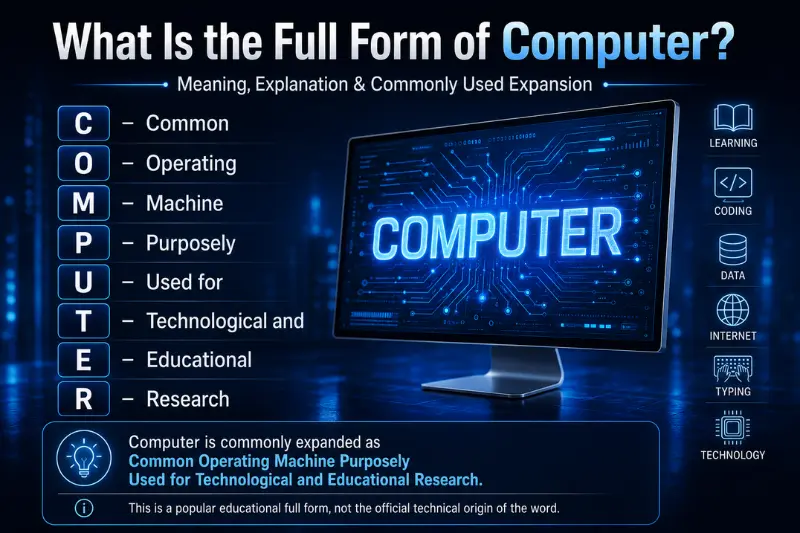
The most common full form of “computer” is “Common Operating Machine Particularly Used for Technical Education and Research”.
This full form explains that a computer is a machine used for technical work, education, research, data processing, communication, and many other tasks.
Here is the letter-by-letter meaning:
| Letter | Full Form |
|---|---|
| C | Common |
| O | Operating |
| M | Machine |
| P | Particularly |
| U | Used for |
| T | Technical |
| E | Education and |
| R | Research |
This expansion is useful for school students and beginners, but it should not be treated as the official origin of the word computer.
Is Computer Really an Acronym?
No, computer is not officially an acronym.
This is one of the biggest misunderstandings about the full form of computer. Many websites directly say that COMPUTER stands for a fixed phrase, but the truth is slightly different.
The word computer comes from the word compute, which means to calculate. In earlier times, the word computer was used for a person who performed calculations. Later, when machines began performing calculations automatically, the same word was used to refer to them.
So, the popular full form is a backronym. A backronym means a phrase created later from the letters of an existing word.
In simple words:
- Computer is a real word.
- It originally meant a calculating device.
- The full form is a popular learning phrase, not an official technical definition.
This makes your understanding more accurate than simply memorizing the full form.
Simple Meaning of Computer
A computer is an electronic machine that accepts data, processes it, stores it, and gives useful output.
For example, when you type numbers in a calculator app, the computer accepts your input, processes the calculation, and shows the answer on the screen.
A computer can perform many tasks, such as:
- Writing documents
- Solving calculations
- Browsing the internet
- Playing videos and games
- Storing files
- Sending emails
- Creating designs
- Managing business data
- Running software and apps
This is why understanding the full form of computer is only the first step. To understand computers properly, you also need to know how they work and where they are used.
Definition of Computer
A computer is an electronic device that receives input from the user, processes the data according to instructions, stores information, and produces output in a useful form.
A simple definition is:
A computer is a smart electronic machine that processes data and converts it into meaningful information.
This definition is easy to remember because every computer works mainly through four steps:
- Input
- Processing
- Output
- Storage
How Does a Computer Work?
A computer works through a simple process called the IPO cycle. IPO stands for Input, Process, and Output. Storage is also an important part of this cycle.
| Step | Meaning | Example |
|---|---|---|
| Input | Data or command given to the computer | Typing with a keyboard |
| Processing | Computer works on the data | CPU calculates or organizes data |
| Output | Final result shown to the user | Result appears on monitor |
| Storage | Data is saved for later use | File saved on SSD or hard drive |
For example, when you create a document:
- You type words using a keyboard.
- The CPU processes your typing.
- The monitor shows the text.
- The file gets saved in storage.
This simple process happens very quickly, which makes computers powerful and useful.
Main Parts Of A Computer
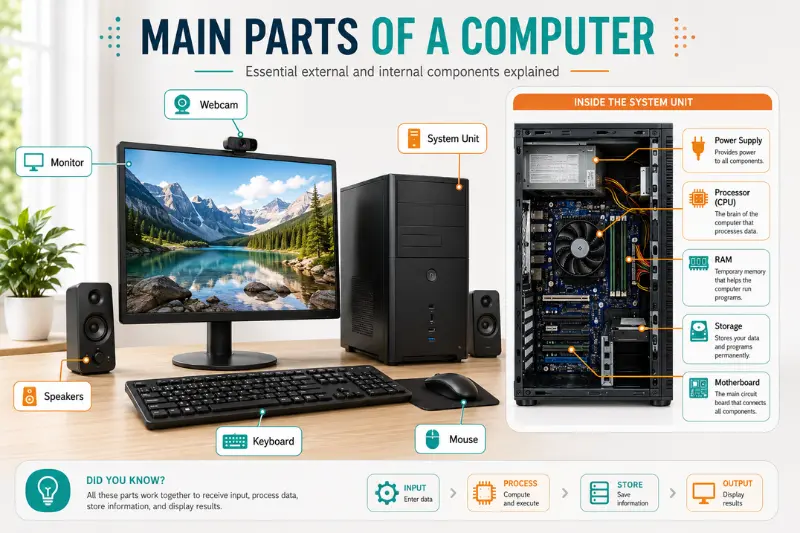
To understand the full form of computer better, you should also know the main parts of a computer. A computer is made of different hardware and software components that work together.
1. CPU
CPU stands for Central Processing Unit. It is known as the brain of the computer because it processes instructions and controls other parts of the system.
2. RAM
RAM stands for Random Access Memory. It stores temporary data while the computer is running. More RAM helps a computer work faster when using multiple programs.
3. ROM
ROM stands for Read-Only Memory. It stores permanent instructions that help the computer start and function properly.
4. Storage Device
Storage devices save files, apps, videos, documents, and system data. Common examples include HDD, SSD, pen drives, and memory cards.
5. Motherboard
The motherboard is the main circuit board of the computer. It connects the CPU, RAM, storage, and other hardware parts.
6. Input Devices
Input devices help users send data to the computer. Examples include:
- Keyboard
- Mouse
- Scanner
- Microphone
- Webcam
7. Output Devices
Output devices show or produce the result after processing. Examples include:
- Monitor
- Printer
- Speaker
- Projector
8. Software
Software is a set of instructions that tells the computer what to do. Examples include Windows, Chrome, Microsoft Word, Photoshop, and mobile apps.
Hardware and Software Difference
Many beginners understand the full form of computer, but they still get confused between hardware and software.
| Hardware | Software |
|---|---|
| Physical parts of a computer | Programs and instructions |
| You can touch it | You cannot touch it physically |
| Examples: CPU, keyboard, monitor | Examples: Windows, browser, games |
| Works with electricity and circuits | Works through code and commands |
A computer needs both hardware and software. Hardware is the body, and software is the instruction system that tells the body what to do.
Types of Computers
Computers come in different sizes and are used for different purposes.
1. Desktop Computer
A desktop computer is used on a desk. It is common in schools, offices, and homes.
2. Laptop
A laptop is a portable computer. Students, freelancers, business owners, and professionals use laptops because they are easy to carry.
3. Tablet
A tablet is a touchscreen computer. It is useful for reading, watching videos, drawing, and light work.
4. Server
A server stores and manages data for websites, apps, companies, and networks.
5. Supercomputer
A supercomputer is a very powerful computer used for scientific research, weather forecasting, space research, and complex calculations.
6. Embedded Computer
Embedded computers are built inside machines and devices, such as washing machines, cars, ATMs, smart TVs, and medical equipment.
Uses of Computers in Daily Life
The full form of computer tells us that computers are used for technical education and research, but their use is much wider today.
Education
Computers help students learn through online classes, videos, digital books, assignments, quizzes, and research.
Business
Businesses use computers for billing, accounting, communication, inventory, data management, and online marketing.
Banking
Banks use computers for transactions, account records, online banking, ATM systems, and security checks.
Healthcare
Hospitals use computers to store patient records, manage appointments, analyze reports, and support medical research.
Communication
Computers make communication easy through emails, video calls, social media, messaging apps, and online meetings.
Entertainment
People use computers for movies, music, games, editing, streaming, and digital content creation.
Research
Researchers use computers to collect data, analyze results, run simulations, and prepare reports.
Importance of Computer in Education

Computers have changed the way students learn. They make education more interactive, visual, and flexible.
In education, computers help students:
- Search for information quickly
- Prepare assignments and presentations
- Watch educational videos
- Learn coding and digital skills
- Attend online classes
- Practice quizzes and tests
- Improve typing and research skills
For modern students, computer knowledge is not optional anymore. It is a basic skill needed for school, college, jobs, and business.
Advantages of Computers
Computers offer many benefits in daily life.
Speed
Computers can process data much faster than humans.
Accuracy
A computer gives accurate results when the input and instructions are correct.
Storage
Computers can store large amounts of data, including documents, images, videos, and software.
Multitasking
A computer can run multiple programs at the same time.
Automation
Computers can perform repeated tasks automatically, which saves time and effort.
Communication
Computers connect people through the internet, email, video calls, and messaging platforms.
Learning Support
Students can use computers to access digital libraries, tutorials, courses, and learning tools.
Limitations of Computers
Although computers are powerful, they also have some limitations.
- A computer cannot think like a human.
- It needs electricity or battery power.
- It can be affected by viruses and malware.
- It may cause eye strain or posture problems if used for long hours.
- It depends on correct instructions.
- It cannot make emotional or moral decisions on its own.
Computers are smart machines, but they still need human guidance.
Full Form of Computer vs Computer-Related Full Forms
There is a clear difference between the full form of computer and computer-related full forms.
The word computer is not an official acronym. But many terms used in computers are real abbreviations, such as CPU, RAM, ROM, USB, HTML, and PDF.
For example:
- CPU means Central Processing Unit.
- RAM means Random Access Memory.
- USB means Universal Serial Bus.
- HTML means HyperText Markup Language.
So, when you learn about the full form of computer, you should also learn the common computer-related abbreviations because they are useful in exams, interviews, and daily technology use.
Important Computer-Related Full Forms
Here are some useful computer full forms every student should know.
| Short Form | Full Form |
|---|---|
| CPU | Central Processing Unit |
| RAM | Random Access Memory |
| ROM | Read-Only Memory |
| HDD | Hard Disk Drive |
| SSD | Solid State Drive |
| USB | Universal Serial Bus |
| GPU | Graphics Processing Unit |
| OS | Operating System |
| BIOS | Basic Input/Output System |
| ALU | Arithmetic Logic Unit |
| CU | Control Unit |
| PSU | Power Supply Unit |
| UPS | Uninterruptible Power Supply |
| LAN | Local Area Network |
| WAN | Wide Area Network |
| WLAN | Wireless Local Area Network |
| IP | Internet Protocol |
| DNS | Domain Name System |
| ISP | Internet Service Provider |
| URL | Uniform Resource Locator |
| WWW | World Wide Web |
| HTTP | HyperText Transfer Protocol |
| HTTPS | HyperText Transfer Protocol Secure |
| FTP | File Transfer Protocol |
| SMTP | Simple Mail Transfer Protocol |
| HTML | HyperText Markup Language |
| CSS | Cascading Style Sheets |
| JavaScript | A programming language used for web pages |
| SQL | Structured Query Language |
| PHP | Hypertext Preprocessor |
| XML | Extensible Markup Language |
| JSON | JavaScript Object Notation |
| Portable Document Format | |
| JPEG | Joint Photographic Experts Group |
| PNG | Portable Network Graphics |
| GIF | Graphics Interchange Format |
| ZIP | A compressed file format |
| AI | Artificial Intelligence |
| ML | Machine Learning |
| IoT | Internet of Things |
| UI | User Interface |
| UX | User Experience |
| DBMS | Database Management System |
| RDBMS | Relational Database Management System |
| API | Application Programming Interface |
| VPN | Virtual Private Network |
| CDN | Content Delivery Network |
| SSL | Secure Sockets Layer |
| TLS | Transport Layer Security |
| HDMI | High-Definition Multimedia Interface |
| VGA | Video Graphics Array |
These full forms help students build a strong foundation in computer basics and information technology.
Common Mistakes Students Make About the Full Form of Computer
Many students make small mistakes while learning the full form of computer. Here are the most common ones:
Mistake 1: Thinking Computer Is Officially an Acronym
The popular full form is helpful, but it is not the official origin of the word.
Mistake 2: Confusing Technical and Technological
Some versions use “Technical,” while others use “Technological.” The most commonly used school version is “Technical Education and Research.”
Mistake 3: Only Memorizing the Full Form
Memorizing the full form is not enough. You should also understand what a computer does, how it works, and where it is used.
Mistake 4: Mixing Computer Full Form With CPU Full Form
Computer and CPU are not the same. A computer is the complete machine, while CPU is one important part of it.
Easy Way to Remember the Full Form of Computer
You can remember the full form of computer by breaking it into simple parts:
Common Operating Machine
This means it is a machine used by people for many tasks.
Particularly Used for Technical Education and Research
This means it is useful for learning, technical work, and research.
Memory line:
“Computer is a common machine used for technical education and research.”
This simple sentence can help students remember the full form easily.
Why Computers Are Important Today
Computers are important because they save time, improve accuracy, store information, and connect people across the world. Almost every field now depends on computers in some way.
Students use computers for learning. Teachers use them for lessons. Businesses use them for management. Doctors use them for records and diagnosis. Designers use them for creative work. Programmers use them to build websites and apps.
From a simple school project to advanced space research, computers support millions of tasks every day.
Conclusion
The commonly used full form of computer is Common Operating Machine Particularly Used for Technical Education and Research. This full form is popular in schools and learning materials, but it is important to remember that computer is not officially an acronym. The word computer comes from “compute,” which means to calculate.
A computer is an electronic device that accepts input, processes data, stores information, and gives useful output. It has become an essential part of education, business, healthcare, banking, communication, entertainment, and research.
If you are a student or beginner, learning the full form of computer is a good starting point. But to build real knowledge, you should also understand the meaning, parts, working process, uses, advantages, limitations, and common computer-related full forms.
FAQs
What is the full form of computer?
The commonly used full form of computer is Common Operating Machine Particularly Used for Technical Education and Research.
Is computer an official acronym?
No, computer is not officially an acronym. It comes from the word “compute,” which means to calculate. The popular full form is a backronym used for learning.
What is a computer in simple words?
A computer is an electronic machine that takes input, processes data, stores information, and gives output.
Who is known as the father of the computer?
Charles Babbage is known as the father of the computer because he designed the early mechanical computing machine.
What are the main parts of a computer?
The main parts of a computer include CPU, RAM, ROM, motherboard, storage device, input devices, output devices, and software.
What is the full form of CPU?
CPU stands for Central Processing Unit. It is known as the brain of the computer.
What is the full form of RAM?
RAM stands for Random Access Memory. It stores temporary data while the computer is working.
What is the full form of ROM?
ROM stands for Read-Only Memory. It stores permanent instructions used by the computer.
Why are computers important for students?
Computers help students learn, research, prepare assignments, attend online classes, improve digital skills, and access educational resources.
What is the difference between computer and CPU?
A computer is the complete electronic machine, while the CPU is one main part of the computer that processes instructions.
YOU MAY ALSO LIKE:
Happy Eve Meaning – What It Really Means and How to Use It
FYKI Full Form – Meaning, Email Use, Examples, and FYI Difference
Mobile Learning Platform Guide for 2026 That Actually Improves Learning Results
FCI HRMS: Login, Payslip, Leave, ERS Portal, App & Employee Services